Sunday, January 27, 2008

Panoramas from the trail


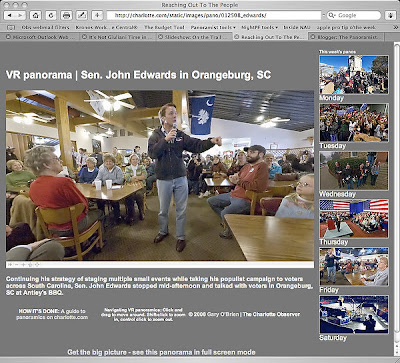
I have been on the road this week in South Carolina with the Democratic candidates. My primary mission was to shoot stills for the paper and online slideshows. We have been running a daily slideshow on the politics page on charlotte.com.
Of course, I also wanted to shoot panoramas!

The rig I used is simple: Sigma 8mm, Nikon D70s, hardwire shutter release, Nodal Ninja 3 head, tall monopod. I keep the strap on the camera and with the monopod retracted, it fits over my shoulder, just like having a third still body. One pano (Monday MLK rally) was handheld, holding the camera high above my head. You can see my shadow in the image.
This lens and camera combo provides enough overlap to allow shooting just four frames in each situation.

When in the buffer at campaign events, I'd kneel and extend the monopod fully. Drawing it as close as possible to me, I'd visually select a spot on the ceiling and try to keep the monopod aligned with that spot as I rotated it 90 degrees for each frame.
In other situations, I'd either stand behind the camera and move along with its rotation, or put the monpod on top of something firm (riser, rope-line stand, abandoned TV tripod). The problem with standing behind the camera and moving with it is that you need quite a bit of floor space, which is at a premium in these situations.

I learned several things.
First, if you're using this rig above your head, don't look up! Your face will be in the nadir of the pano.
Second, practice this at home! If the situation is moving, you have to be quick. Looking at my EXIF data, I was shooting a frame a second in some situations. Click-rotate-click-rotate, all the time trying to keep the monopod relatively vertical.
Third, shoot lots of images. It's very hard to look behind you while keeping the monopod vertical, so you have no idea what's going on back there.

Stitching was helped immensely by setting vertical control points in each frame. This allows PTGui to compensate for variations in the verticality of the monopod between images. In the Control Point window, have the same frame in both panes. Look for vertical lines (door frames, walls, etc., something architectural). Place a point on one end of the line the left pane, then a point on the other end of the line in the right pane. Try to set at least two in each frame, then let PTGui generate control points for the overlapping frames.

Stitching also was helped by adding control points manually in the nadir and zenith regions of each overlapping image pair.
There will be large errors in your initial optimization. I first optimize with no parameters (FoV, a, b, c) selected. Delete the worst of the control points (CPs). I try to visualize the control points as a fever chart. If there's a big drop, I'll delete the points above the drop.
Then select FoV and re-optimize. Delete bad CPs, add the b parameter and reoptimize. Repeat for c, then a. It's surprising how few CPs are needed in the end to optimize.

As you can see, a couple of the final panos have their fields of view restricted. Since I'm not shooting nadir and zenith on these images for the most part, there are unretrievable stitching errors in the polar regions, which often don't contain much content.

What would I do differently the next time?
I'd get a more substantial remote release. I had a cheap one for the D70s which broke, forcing me to switch to another camera (D200) with poor performance in high ISO (Saturday Obama finale).
The holder that flag bearers use would be a useful addition for my belt. I could put the monopod in that and use myself as an extender.
I'd get a full-frame camera to allow greater overlap between frames, plus I could possibly shoot only three frames which would make shooting action easier. Anyone want to loan me a D3?

I hope this is enough info to help you try getting off the sticks and shoot more dynamic subjects. Questions? Just ask.

NOTE: this post updated 9 August 2008 to change links to reflect change in the Charlotte Observer site domain name.

Sunday, January 13, 2008

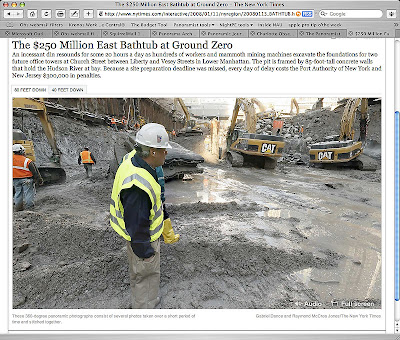
In the Bathtub with NYT


The latest from the New York Times team of Ray Jones and Gabriel Dance. This time, they take us to two levels in the big hole at Ground Zero to take a look at the construction going on in lower Manhattan. The ambient sound is a good touch. Zoom navigation is a bit different here - they've opted to use a right-click (or control-click) submenu to control zoom, rather than keyboard+click shortcuts. I've asked Ray about the tripod being left in the image. As soon as he replies, I'll update. And I will post a nadir patch tutorial as soon as I can.

UPDATE: This from Ray via email: "Well, the tripod thing is something we'll do better next time. I didn't shoot any handheld nadir shots, and that was my fault. And I didn't feel comfortable just trying to clone the tripod away. So we felt it was best to just leave it. I think we're improving each time and it will take us a few more times probably before we nail everything. "

This project was the lead tout on the nyt.com site for awhile over the weekend. That'll bring panoramas to the attention of more viewsers.

I find it useful in this kind of situation - deep shadowed areas and bright sky - to use a Photoshop action called HDR for Dummies written by famed panographer Jook Leung. (You've seen his Times Square at New Year's Eve panos).

Rather than bracket exposures (and risk lots of subject movement), I acquire two tiff files from each RAW image, one adjusted for shadows, one adjusted for highlights. The HDR action blends the two, allowing for a longer dynamic range. Kind of reminds me of split-filter printing on variable-contrast paper, back in the b/w darkroom days.

Your views on using this kind of blending in photojournalism? Discuss. Please feel free to add to the comments.

Wednesday, January 2, 2008

Happy New Year!

OK, let's get back to work!

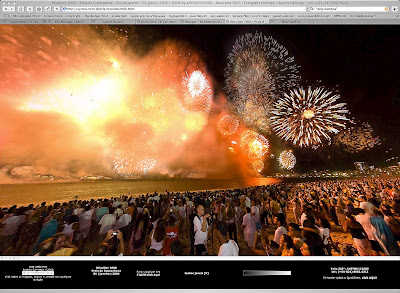
To kick off the new year, here are a couple of panoramas from New Year's Eve in Rio de Janiero. I found these on the PanotoolsNG Yahoo group.

Willy Kamena

Ayrton Carmago

Willy Kamena of Bremen, Germany was visiting Ayrton Camargo of Rio de Janiero, and the two went to the beach for the New Year's Eve fireworks. You can see both Ayrton and Willy at work in these two images.

Note they are both using fill flash (absolutely necessary in this situation), Ayrton's fill balance is just about perfect with the light provided by the fireworks. A reader on the Panotools NG group asked him about his flash rig, here's what he had to say: "I use the Gary Fong diffuser, always pointing to the sky. Doesnt matter where I'm (at) if there's a ceiling or not! And I put the flash NOT on TTL. Always use on A (automatic)."

Ayrton is using a pole rig to get his camera up higher. Willy is using a monopod, but at eye level.

Also note the use of simple ambient sounds embedded in the full-screen html. I think this adds to the "being there" effect.

Why are these panos cool? These photographers are using the techniques we need to shoot photojournalistic panoramas. They're traveling fast and light, using monopods and poles rather than tripods. They're using fill flash to reveal content in areas where there is nothing but darkness. And they're working under difficult lighting conditions with moving subjects.

Saturday, December 15, 2007

Plug-ins for Flash Panorama Player


For years, panoramas have been presented on the web using QuickTime VR or Java-based players.
Flash Panorama Player ("FPP") has come on the scene recently and is rapidly becoming the presentation tool of choice for VR photographers. Created by Denis Chumakov, FPP is a viewer engine built on Adobe Flash Player.
FPP is a great tool. So is Flash. They're great together, and even better if you are a programmer. I am not.
At its most basic, FPP can be used to publish panos just by copying files. Here's an example of what you get when you simply copy files. It's a basic presentation, but it works well. Note the inertial damping of the motion, and the window resizing. These are just two of the features of FPP.
Fortunately, Patrick Cheatham and Zephyr Renner ARE programmers. They've created Flashpanos.com, a site dedicated to making available inexpensive FPP plugins and (this is the best part) rewriting the documentation included with FPP. They describe what they're doing this way: "Some of this is taken from existing documentation, some is reworded, some is from experience. The idea isn't to replicate existing FPP documentation, but to rework and expand it."
As an example, they've posted FPP documentation for fullscreen panoramas here. More documentation is in the works.
If you have a colleague who is a Flash programmer, turn them on to this now. Let them help you build an integrated Flash presentation for your panoramas.

Friday, December 14, 2007

Gigapans at pghtrib.com

Where's Waldo?
Kudos to PghTrib.com for taking on the Gigapan camera and putting it to work for viewsers. This isn't exactly the photojournalistic use of panorama we've been concentrating on here on The Panoramist, but it has an incredible wow and cool factor.


GigaPan is a combination of hardware and software (Developed by Carnegie Mellon University in collaboration with NASA Ames Intelligent Robotics Group, with support from Google) that allows multiple images (often hundreds) to be shot precisely and stitched together into a large-scale multiple-row panorama. This allows for remarkable resolution in a single image, reminiscent of the photos taken by early photographers of American landscapes such as William Henry Jackson. Face to face with a contact print of one of Jackson's 18"x22" glass plates, one needs only a magnifying glass to go deep into the image. GigaPan gives us the ability to present this experience to our viewsers.

One could do the same thing with PTGui and a panoramic head, painstakingly shooting several rows of multiple images with a long lens and spending more than a few hours at the computer. GigaPan appears to streamline this process, making it accessible for us regular folks.

Do note, however, (quoting from the GigaPan FAQ): "Because a panorama is assembled from multiple pictures, sometimes you'll see strange things if something moved between the pictures." As photojournalists, we have to take this into consideration when shooting any panorama that requires multiple images.

Saturday, December 8, 2007

Two weeks to the next World Wide Panorama event

The World Wide Panorama
Join hundreds of panorama photographers from around the globe for this four-times-a-year event. We make panoramas on a theme during windows of time around the solstices and equinoxes, stitch them, post them, then sit back and marvel at the variety of photographic styles, techniques and most importantly, cultures.
The 2007 winter solstice event is a "Best of the Year" theme, where photographers post their favorite panorama of the year. This year's event also features a tribute to the Wrinkle in Time, a pioneering panorama collaboration on the 1997 Winter Solstice.
This is a great opportunity to get great ideas, and to learn from experienced photographers. There are a lot of newbies that come out from behind the curtain for the first time in the WWP.
The geniuses that make the WWP run have made the uploading process easy, and also make it easy to learn how to use Google Maps and Google Earth to further enhance the sense of place a panorama creates.
There's a bonus - posting on the WWP will boost your rating in Google's search engines.
Need more info? Have questions? Join the WWP Yahoo group, and check out the WWP event page.

Wednesday, December 5, 2007

VR Journalism at work in the Phillippines


Fung Yu of the city of Makti shot VR panos of the scene of the lobby of the five-star Peninsula Manila hotel where an attempted coup took place last week. You may have seen the stills from this scene, which were interesting enough but didn't really have enough information to get a sense of the scene.
Check out these panos of the scene to get a real feel of what was happening: http://www.inquirer.net/specialreports/makatistandoff/vr.php
This item was originally posted on the PanoToolsNG Yahoo group.