Friday, January 20, 2012

Jetsonorama Panorama

Click on the link to view full-sized panorama (Flash-based, in new window) on garyobrien.com.

I'm thrilled to have been able to contribute to the The Art of The Rural (new window) blog with a panorama of an installation at Gray Mountain, Arizona (new window) by Chip Thomas (new window). I thought it could be used as a link accompanying a January 11, 2012 post on Chip's work, and was I surprised it got a separate post (not complaining, mind you - thanks, Matthew!).

From far away in North Carolina, I had admired Chip's work for some time. His work pops up on buildings and other structures from the Rez to Flagstaff to Phoenix to Tucson. His tools are simple - oversized photocopiers and wheat paste. His images of people who live in threatened communities carry dramatic impact in and of themselves. Given their size and in-your-face locations, you can't avoid the message the carry.

Read more about Chip's work on his blog yo mama!, and on Art of the Rural herehere and here.

The back story on the image is a fun one. While visiting NAU in October 2009 for homecoming and to meet with photography students, I talked my friend the incredibly talented Seattle Times photographer Erika Schultz into accompanying me on an evening expedition to photograph his work on some abandoned fuel tanks near Gray Mountain, AZ, about 45 minutes north of Flagstaff.

It was quite the scene, with the lights of the vehicles traversing the long slope from the San Francisco Peaks toward the Little Colorado River crossing at Cameron, AZ and the Milky Way wheeling overhead.

Now that I'm back in the West, living in Tucson, I look forward to seeing more of Chip's work, and perhaps even meeting him in person somewhere along the paths where his work pops up from time to time.

Tech talk:
Nodal Ninja 5 panorama head
Nikon D700; AF-Fisheye Nikkor 16mm f/2.8; ISO 1600, 30 sec. @ f/2.8
8 images - 6 around, 1 up, 1 down
Acquired in Adobe Photoshop Camera Raw
Stitched with PTGui.
Output to Flash with Pano2VR
Fuel tanks painted with Nikon SB800 strobe

Thursday, July 7, 2011

Little do they know...

Cathy Franklin made photos in Paradise Valley overlooking Mummy and Camelback mountains.
Photos originally posted on azcentral.com

I love it when a reporter or a reader unintentionally makes images that overlap and allow creation of a panorama.

On Tuesday evening, residents of central Arizona watched as a massive wall of dust rolled into the Phoenix metropolitan area. azcentral.com, the website for the Arizona Republic and KPNX-TV posted over 200 reader images.

As I was browsing the images, I realized several of them could make panoramas. Since I haven't done much stitching of late, I used this as an opportunity to practice with PTGui. The finished images are here:  http://garyobrien.com/2011/haboobpanos/

Process:
1) screen grab of images from site (photo gallery is in Flash).
2) crop screen grabs at exactly the same size.  I wrote a PS4 action for this.
3) Convert screen grabs to .tif format.
4) Stitch .tif files in PTGui.

As picture editors and multimedia producers, if we can add value to images, we certainly should. This is a fun way to do just that.

Ideally, the full resolution images submitted by the readers would be used for these. With a couple of these readers, I would have contacted them and asked for more images from the same location. I would be willing to bet they have images that work well that they didn't submit.

Saturday, April 9, 2011

Panoramas in the Library of Congress collection

Over 4,000 panoramas here, many in fairly high resolution. Opportunities for rephotographic projects abound.
Here's an example here in Charlotte, NC:


Are there images of your community in this collection that lend themselves to being re-photographed? Let me know how it goes for you as you pursue this idea.

Tuesday, June 1, 2010

Lens calibration in PTGui

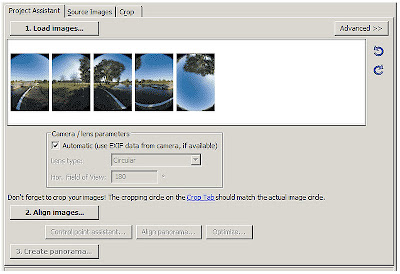
I have found that pole/monopod/handheld panorama projects are much more successful when I insert lens calibration parameters created from a previous "very good" stitch in the Lens Settings tab.

This link from ptgui.com tutorials explains how to create a lens calibration for a particular lens/camera combination.

This is a screenshot for an AF Fisheye Nikkor 16mm f/2.8 on a D700 camera. These were saved after building a particularly successful architectural panorama (1 Bank of America Center Urban Garden).
Retrieving these settings from the Lens Database in the Lens Settings tab when starting a project often yields a panorama that needs very little mask editing to correct stitching/blending errors in the .psd output file. That's a huge time-saver.


The urban garden example was shot on a tripod with a panorama head, so the geometry of the images was accurate. When we shoot using a monopod, or when handholding, the images generally are not accurately overlapped, or always shot on the No Parallax Point. Using a lens calibration allows PTGui to more easily find overlapping control points - it gets the images "in the ballpark" first.

Follow the instructions in the tutorial, and begin generating lens correction parameters for the lenses you most commonly use when shooting panoramas.

There are more images from the 1 Bank of America Center shoot on our panorama page at charlotteobserver.com. The 30th floor terrace and interior as well as the workers atop the atrium were made with a circular fisheye lens on an FX format camera, shooting four images around at roughly 90 degrees of overlap. Using the lens calibration for this camera and lens combo cut quite a bit of time from production.

Wednesday, April 14, 2010

Upcoming news from Nodal Ninja and a plug for the NPPA Multimedia Workshop


Bill Bailey is tweeting (@nodalninja) about a new product announcement today from Nodal Ninja at the Tucson 2010 International Panoramic Photography Conference. The conference should yield some interesting nuggets of what's next in the panorama world. I wish I was there!


I will be at the NPPA Multimedia Immersion May 18-22 in Syracuse, NY at Syracuse University in the S.I. Newhouse School for Public Communications. Will Yurman of "Round Rochester" pano blog renown and I will lead a couple of panorama sessions during the workshop. I understand registration is nearly full, so sign up now if you want to learn the latest in multimedia taught by a bunch of experienced professionals.

Sunday, September 20, 2009

Update: Panorama of the Week on LAT.com? Well, not really...


Just heard from Bryan Chan of LATimes. He confirms Paul Fretheim's followup (see below) on the weekly feature. Brian says, "I'm not sure where a reader got the "pano of the week" idea. We just do them as needed."

Paul replied to me Sunday as follows (I should have posted this then):

"Most pages at the LA Times site have tabs for "Local," "National," "World," etc. Under the local tab if you scroll down there is a header that is over a list of links that says "Weekly Features" and that is where the link was to the panorama. I may have overstated it when I wrote "Panorama of the Week." When I went back and looked at it again, it was unclear if it really means that they will have a panorama on a weekly basis."

Bummer. I was hoping one of the big dogs would take the lead and do a weekly feature.

If anyone knows of someone doing a weekly panorama feature, I'll bow at their feet.

===============

According to a post from Paul Fretheim on the PanoToolsNG Yahoo group (text of the is message below), The Los Angeles Times is starting a "Panorama of The Week" feature.

The link is to a pano from Bryan Chan of the Los Angeles Times,who produced a group panorama of the LA Philharmonic, with hotspots giving us more info on the players.

I looked about the LAT site, and didn't see anything specifically touting "Panorama of The Week". However, there is a panoramas section on the Multimedia page.

Good use of hot spots, and if LAT is doing a pano of the week, that's a big boost (and a motivator) for the rest of us.

======================
Via PanoToolsNG@yahoogroups.com:

L.A. Times "Panorama of the Week"
Posted by: "Paul Fretheim" paul@inyopro.com inyopro
Sat Sep 19, 2009 5:44 am (PDT)

Apparently the Los Angeles Times has initiated a feature they are
calling "Panorama of the Week." Here is the one from today's "paper,"
that is, the L.A. Times web site:

http://www.latimes.com/entertainment/news/arts/la-laphil-pano,0,3418644.htmlstory

Paul Fretheim
======================

Wednesday, August 12, 2009

Prison Riots Aftermath | Bryan Chan - LATimes


This is a good use of a panorama, to put the viewer in the news scene. I'm curious as to why the burned out housing block isn't the featured panorama. It is a powerful scene, and I would also have liked to see the prison courtyard.

I'd like to hear from Bryan about conditions, etc. during the tour if that's possible.

Working the nadir into our panoramas is a challenge, yet it is doable. Many of you don't include it, and I'd like to hear why. Is it a technical problem, stitching problems, or a question of photo manipulation ethics? Post a comment, or drop an email if you're shy. I'd like to help if I can.

This blog has been quiet of late and I want to change that. What do you want to learn? Also, please send links of yours and others' work to help prime the pump.

Monday, June 8, 2009

Panoramas at NPPA Visual Journalism Workshops


If you're coming to the NPPA Visual Journalism Workshops and plan to attend the panorama session, there will be panorama heads, lenses and demo versions of software for your use.

Bill Bailey at Nodal Ninja has loaned us six of his company's panorama heads (3 NN3 and 3 NN 5) plus levelers for your use. These heads are also available for purchase at a workshop discount of 10%.

We'll also have a couple of Bo Bracket pano heads for the Sigma 8mm f/3.5 available.

Canon, Nikon and Sigma have loaned lenses, a mix of fisheyes, extreme wide-angle, and wide-angle zooms.

There will be demo versions of PTGui and Pano2VR available for you to load onto your laptops.

If you have a tripod or monopod, bring that if you can fit it in your kit.

During the sessions, I'll fill you in on gear checkout. I plan to set up times on Thursday and Friday for one-on-one with anyone who needs help with stitching, and critique if you desire.

Feel free to contact me directly (gary [at] garyobrien {dot} com) if you have questions.

Monday, May 11, 2009

What do you want to learn about?

I'm preparing materials for a panorama demo workshop at the NPPA 2009 Visual Journalism Workshops

In a general sense - even if you're not going to attend the workshop - what do you want to learn about shooting panoramas?

What information do you need? How to shoot them, gear, using software, presenting, printing?

Let me know - specific questions are best. Please use the comments so others can see.
 
I look forward to hearing from you.


Thursday, November 13, 2008

On the Border

Quick post, because I'm about to board a flight to RDU at Phoenix Sky Harbor. Pat Shanahan of the Arizona Republic has a nice package of panos from the Arizona-Mexico border.

Take a look: http://www.azcentral.com/flash/borderfence360/borderfence360_index.html

I'll post more later... I had a nice chat/impromptu pano seminar with Pat and Dave Seibert from the Republic this week, and I can tell you more about how the project came about.

Saturday, October 25, 2008

Calling All Panoramists

I'm wondering how many of you are regularly publishing panoramas on your publication's website. 

If you are - tell me. I want to feature the work you all are doing. Don't be shy.

Post a reply, or email me!

Thursday, September 18, 2008

Meet My Friend Bo

I've been working with a new panorama tool this past month or so, and I'm liking it a lot.

It's the Bo Bracket, a simple, light, accurate panorama bracket made by Bo Lorentzen, a photographer and computer graphics artist. The bracket is made of model aircraft birch plywood, cut with a precision laser and laminated.

The bracket is designed for specific lenses.  I ordered mine to fit my Sigma 8mm f/4 fisheye.  It's also available for the Sigma 8mm f/3.5, the AF Fisheye-Nikkor 10.5mm f/2.8, and several point-and-shoot fisheyes. 

Its construction is simple - the base with 3/8" tripod mount socket, the lens bracket, and a long screw with wingnut to hold it all together. It clamps around the lens, allowing it to be rotated around its no-parallax point (NPP), or "nodal point". 

Bo recommends using a Manfrotto 259B tripod extension column as a rotator, since the base of his bracket is too small to allow attachment to a regular size tripod head.

I'm using mine atop a short metal post that originally was part of a Forscher Polaroid back for a 35mm film SLR. (Moral of this story - never throw any piece of photo gear away, no matter how obsolete).

The post and Bo Bracket go atop a monopod, and I rotate that, being careful to keep it as vertical as possible. This is very similar to how I used the Nodal Ninja 3 on the campaign trail earlier in 2008. It's very helpful to use a hot-shoe two-axis bubble level
or a surveyor's rod level to keep the monopod vertical. 

I use the monopod from both ground level and holding the monopod up as high as I can. In the picture at left, I'm using my credential holder to hold up the monopod. A flag holder like you might see in a parade would work very well for this. And of course, you'll need a wired remote release.

There are a couple of things to be aware of. In my early testing, I was using the bracket with a Nikon D200. The overhang of the D200's prism cover contacts the bracket, but I was able to turn the lens 90 degrees and mount the camera. Depending on the camera model, this may prevent getting the lens fully into the bracket, thus missing the NPP.

Also, the instructions included with the bracket caution that it's very sensitive to moisture. It's recommended to coat it with epoxy if it's going to be used in wet environments.

The one thing the bracket can't do is to swing up and down to shoot zenith and nadir precisely from the NPP. In the tests I shot (not shooting up or down, but just around), the zenith hole was minimal and could easily be patched by editing the top cube face. The footprint of the bracket is quite small, making a nadir patch easier. The nadir can be shot handheld away from the NPP if necessary. PTGui's viewpoint correction feature makes stitching these off-NPP images much easier.

I put the rig to the test this past weekend at the new zMax Dragway @ Concord. Check out the three panoramas on this page of Thatsracin.com, our motorsports website. These panos were all shot with the Nikon D700 full-frame sensor camera and my trusty Sigma 8mm f/4 fisheye. I've wanted the three-frame advantage of a full circular image, and I wasn't disappointed. I'll post my impressions of shooting and stitching circular images in the next few days.

Tuesday, September 9, 2008

Way Useful Lens Database

Thanks to Nhat V Meyer of the San Jose Mercury News for posting (via the NewspaperVideo Yahoo group) a link to VRWave.com. It looks like the site is under construction, but it's already worthy due to its excellent list of lenses (Canon, Nikon, etc.) and their specifications for panoramic use.

Not only do we use fisheyes for panoramas, we can also use conventional lenses (both prime and zoom). And, we don't have to shoot full 360x180 panoramas - partial cylindrical panoramas can work quite well for story telling especially if you need a really wide view. If you remember the Widelux or Horizon panoramic film cameras, these panoramas will remind you of that"bananarama" effect. Here's an example I shot earlier this year where I needed to have both the building we were reporting on and the skyline. Another advantage of cylindrical panos is they're easier to publish in print - you don't have the extreme distortion at the top and bottom of the images as in equirectangular projections.

The database includes Field of View parameters for these lenses, and (this is the best part) it tells you how to set up a multi-row panorama. The key info is: pitch in degrees for each row, number of rows, and number of images per row. This is key information if you're going to stitch a multi-row, high-resolution panorama for posting to gigapan.org (see an earlier post for details). PTGui handles these multi-row panoramas quite nicely.

Monday, September 8, 2008

Damn Near Perfect


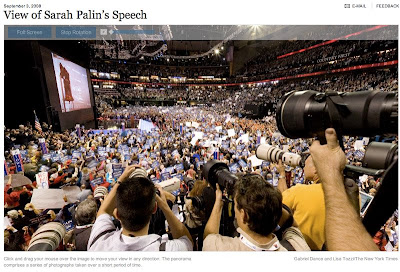
Back from Beijing, Gabriel Dance of nyt.com puts the viewer there during Sarah Palin's speech at the Republican National Convention. I was struck by this pano in that I can't find a single stitching error anywhere, which is impressive given the situation and subject matter.
I asked Gabriel about the shoot and his gear. Here's his response, which sums up the difficulties of making panos in these situations:

Camera: 5D, 15mm fisheye lens
Rig: ballhead tripod, nodal ninja 5
Stitching: PTGUI Pro
"The most difficult thing about these shots is getting them (which
sounds obvious), but really in these types of situations, as you well
know, all the photogs are trying to get their shots and it's a
balancing act between getting the pano, and not getting shanked by an
angry photog's monopod after blocking their shot. And the space is at
a premium as you can tell from the pano. For this one I was on the
stage left cut-stand and I made sure to get their a good hour before
the shot. Shake hands with the other photographers and let them know
what I'm doing. Let them know that I'll keep my tripod tight and in
my spot. Then, when the time is right, hit the shots as quickly as I
can, making sure not to push/move/lean on the tripod.
And hope for the best...
Then it's some Photoshop, just a little bit of layer blending is
sometimes necessary in case anybody is obviously cut in half, and then
we're done. With these speed is essential. I had this up a lil over
an hour after it was shot."

The embedded audio (recorded by Lisa Tozzi) is an excellent addition.

Saturday, August 9, 2008

Big-Time, Big-Event Pano


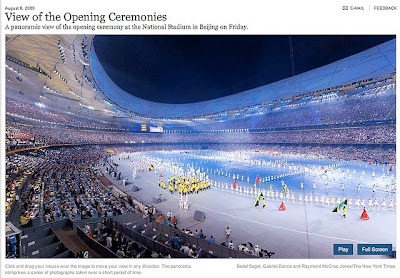
Multimedia producers Bedel Saget, Gabriel Dance and Raymond McCrea Jones of the New York Times website created a fine panorama of the parade of athletes in the opening ceremonies of the Beijing Olympics. These guys have come a long way from where they started. Practice makes perfect. I'm hoping we see a number of panos from this team over the next couple of weeks. I suspect they have something very cool up their collective sleeve!

Sunday, March 9, 2008

Introduction to Panoramas on digitalartwork.net


A great resource for multimedia journalists is digitalartwork.net, the site of the multi-talented Zach Wise. He is a multimedia producer at the Las Vegas Sun who I met at the 2007 NPPA Multimedia Immersion in Portland, OR. He's also a great teacher.
As part of his multimedia work, he shoots 3-shot panoramas with a Sigma 8mm and a Canon 5D. This is a great setup for photojournalists because it's fast, enabling the capture of dynamic scenes. There's sufficient overlap between frames to allow for subject movement in those areas.
Zach has put together a very cool demo that shows the overlap between frames. What happens in those areas between frames is crucial to the success of our panoramas.
The lasvegassun.com website features a link to Zach's panoramas (including one from last week's NASCAR race) and the staff's multimedia on its home page. I'm very envious.

PTGui for Beginners from John Houghton


John Houghton has written several excellent tutorials on his site. His PTGui for Beginners is as good a tutorial as I have found for using PTGui in its Basic mode. It's written for Windows users, but if you're using a Mac, the information about PTGui is nearly identical.

If you've been trying PTGui and are getting frustrated, grab a set of pano images (John provides the set of images used in the tutorial), set aside a couple of hours and go through this tutorial - slowly.

A couple things:
The trial version of PTGui will work just fine for this tutorial.
At first, I would recommend ignoring the part about Smartblend, as the blender built into PTGui will work just fine.
Under the header "Viewing the Stitched Panorama", Mac users can also use Cubic Converter, as well as Pano2VR to convert the equirectangular image into a QTVR file.

Sunday, January 27, 2008

Panoramas from the trail


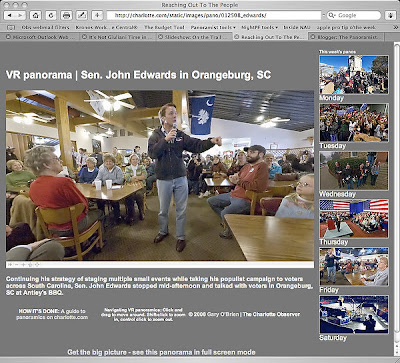
I have been on the road this week in South Carolina with the Democratic candidates. My primary mission was to shoot stills for the paper and online slideshows. We have been running a daily slideshow on the politics page on charlotte.com.
Of course, I also wanted to shoot panoramas!

The rig I used is simple: Sigma 8mm, Nikon D70s, hardwire shutter release, Nodal Ninja 3 head, tall monopod. I keep the strap on the camera and with the monopod retracted, it fits over my shoulder, just like having a third still body. One pano (Monday MLK rally) was handheld, holding the camera high above my head. You can see my shadow in the image.
This lens and camera combo provides enough overlap to allow shooting just four frames in each situation.

When in the buffer at campaign events, I'd kneel and extend the monopod fully. Drawing it as close as possible to me, I'd visually select a spot on the ceiling and try to keep the monopod aligned with that spot as I rotated it 90 degrees for each frame.
In other situations, I'd either stand behind the camera and move along with its rotation, or put the monpod on top of something firm (riser, rope-line stand, abandoned TV tripod). The problem with standing behind the camera and moving with it is that you need quite a bit of floor space, which is at a premium in these situations.

I learned several things.
First, if you're using this rig above your head, don't look up! Your face will be in the nadir of the pano.
Second, practice this at home! If the situation is moving, you have to be quick. Looking at my EXIF data, I was shooting a frame a second in some situations. Click-rotate-click-rotate, all the time trying to keep the monopod relatively vertical.
Third, shoot lots of images. It's very hard to look behind you while keeping the monopod vertical, so you have no idea what's going on back there.

Stitching was helped immensely by setting vertical control points in each frame. This allows PTGui to compensate for variations in the verticality of the monopod between images. In the Control Point window, have the same frame in both panes. Look for vertical lines (door frames, walls, etc., something architectural). Place a point on one end of the line the left pane, then a point on the other end of the line in the right pane. Try to set at least two in each frame, then let PTGui generate control points for the overlapping frames.

Stitching also was helped by adding control points manually in the nadir and zenith regions of each overlapping image pair.
There will be large errors in your initial optimization. I first optimize with no parameters (FoV, a, b, c) selected. Delete the worst of the control points (CPs). I try to visualize the control points as a fever chart. If there's a big drop, I'll delete the points above the drop.
Then select FoV and re-optimize. Delete bad CPs, add the b parameter and reoptimize. Repeat for c, then a. It's surprising how few CPs are needed in the end to optimize.

As you can see, a couple of the final panos have their fields of view restricted. Since I'm not shooting nadir and zenith on these images for the most part, there are unretrievable stitching errors in the polar regions, which often don't contain much content.

What would I do differently the next time?
I'd get a more substantial remote release. I had a cheap one for the D70s which broke, forcing me to switch to another camera (D200) with poor performance in high ISO (Saturday Obama finale).
The holder that flag bearers use would be a useful addition for my belt. I could put the monopod in that and use myself as an extender.
I'd get a full-frame camera to allow greater overlap between frames, plus I could possibly shoot only three frames which would make shooting action easier. Anyone want to loan me a D3?

I hope this is enough info to help you try getting off the sticks and shoot more dynamic subjects. Questions? Just ask.

NOTE: this post updated 9 August 2008 to change links to reflect change in the Charlotte Observer site domain name.

Sunday, January 13, 2008

In the Bathtub with NYT


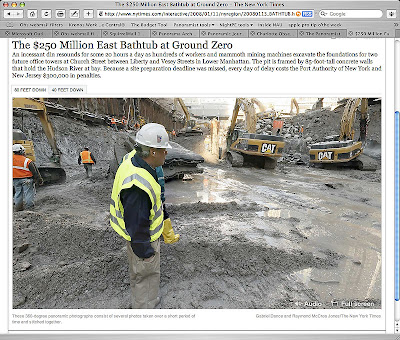
The latest from the New York Times team of Ray Jones and Gabriel Dance. This time, they take us to two levels in the big hole at Ground Zero to take a look at the construction going on in lower Manhattan. The ambient sound is a good touch. Zoom navigation is a bit different here - they've opted to use a right-click (or control-click) submenu to control zoom, rather than keyboard+click shortcuts. I've asked Ray about the tripod being left in the image. As soon as he replies, I'll update. And I will post a nadir patch tutorial as soon as I can.

UPDATE: This from Ray via email: "Well, the tripod thing is something we'll do better next time. I didn't shoot any handheld nadir shots, and that was my fault. And I didn't feel comfortable just trying to clone the tripod away. So we felt it was best to just leave it. I think we're improving each time and it will take us a few more times probably before we nail everything. "

This project was the lead tout on the nyt.com site for awhile over the weekend. That'll bring panoramas to the attention of more viewsers.

I find it useful in this kind of situation - deep shadowed areas and bright sky - to use a Photoshop action called HDR for Dummies written by famed panographer Jook Leung. (You've seen his Times Square at New Year's Eve panos).

Rather than bracket exposures (and risk lots of subject movement), I acquire two tiff files from each RAW image, one adjusted for shadows, one adjusted for highlights. The HDR action blends the two, allowing for a longer dynamic range. Kind of reminds me of split-filter printing on variable-contrast paper, back in the b/w darkroom days.

Your views on using this kind of blending in photojournalism? Discuss. Please feel free to add to the comments.

Wednesday, January 2, 2008

Happy New Year!

OK, let's get back to work!

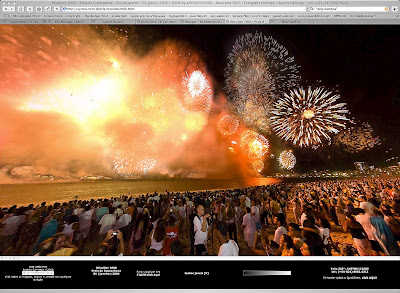
To kick off the new year, here are a couple of panoramas from New Year's Eve in Rio de Janiero. I found these on the PanotoolsNG Yahoo group.

Willy Kamena

Ayrton Carmago

Willy Kamena of Bremen, Germany was visiting Ayrton Camargo of Rio de Janiero, and the two went to the beach for the New Year's Eve fireworks. You can see both Ayrton and Willy at work in these two images.

Note they are both using fill flash (absolutely necessary in this situation), Ayrton's fill balance is just about perfect with the light provided by the fireworks. A reader on the Panotools NG group asked him about his flash rig, here's what he had to say: "I use the Gary Fong diffuser, always pointing to the sky. Doesnt matter where I'm (at) if there's a ceiling or not! And I put the flash NOT on TTL. Always use on A (automatic)."

Ayrton is using a pole rig to get his camera up higher. Willy is using a monopod, but at eye level.

Also note the use of simple ambient sounds embedded in the full-screen html. I think this adds to the "being there" effect.

Why are these panos cool? These photographers are using the techniques we need to shoot photojournalistic panoramas. They're traveling fast and light, using monopods and poles rather than tripods. They're using fill flash to reveal content in areas where there is nothing but darkness. And they're working under difficult lighting conditions with moving subjects.